Medusa Automations
What it is
Medusa Automations is the workflow engine that automatically creates or updates publications and, when needed, generates Smart Zoom articles for those publications.
How it works
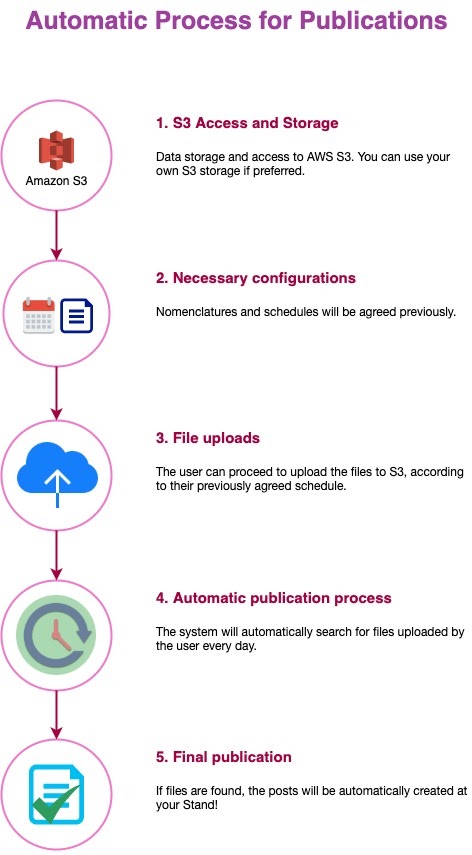
Once enabled for a tenant, Medusa Automations watches a tenant-specific AWS S3 bucket—either on a fixed schedule or on-demand—for new PDF assets (and optionally XML files for Smart Zoom). When matching files are found it:
- Validates file names against the required naming conventions.
- Builds the final PDF using Ghostscript when individual page files are uploaded.
- Sends the processed PDF to Farfalla for ingestion.
- Optionally processes XML files to create Smart Zoom articles that belong to the publication.
- Sends completion notifications by email (to the tenant) and Slack (to #feed-medusa).
Only PDF-based publications are currently supported. EPUBs and Audiobooks are not yet compatible.
Enabling the feature for a tenant
- Sign in to Farfalla Nova.
- Select the target tenant and open its details view.
- Scroll to Custom Features and click Create Tenant Feature.
- Choose Medusa Automations and confirm.
After activation the Publications dashboard will show two extra buttons:
- Dispatch Automation – create a new publication.
- Redispatch Automation – update an existing publication.


Workflow stages
There are three high-level stages:
- Fire an automation – triggered manually (dashboard or Nova) or automatically on a schedule.
- Process the automation – fetch files, transform, publish, generate Smart Zoom.
- Finish – send notifications and persist run history.
Firing an automation
You can dispatch (create) or redispatch (update) a publication via:
- Publications dashboard in Farfalla.
- Automation view in Medusa Nova.
- Scheduled cron execution configured in the automation.
Processing logic (dispatch)
-
Check the S3 path for files that match the expected file name pattern:
prefix-yymmdd-xxx.pdf
Example complete file list for individual pages:LT-200309-001.pdfLT-200309-002.pdfLT-200309-003.pdf
Example for a single-file publication:
LT-200309-000.pdf. -
Generate the combined PDF (when individual pages are provided).
-
Upload the final PDF to Farfalla.
-
If XML files are present, create Smart Zoom articles (see Smart Zoom Articles).
Processing logic (redispatch)
Same as dispatch, except Smart Zoom articles are not regenerated—only publication pages are updated.
Completion
- Email report sent to the tenant's configured addresses.
- Slack notification sent to
#feed-medusa.
Creating a new automation (super-admins only)
-
Open Medusa Nova.
-
Log in (credentials stored in 1Password).
-
Navigate to Automations and click Create Automation.
-
Fill in the required fields:
Field Required Description Tenant ID ✅ The tenant's numeric ID. Name ✅ Friendly name for the automation. Run automatically Enable for scheduled execution. Timezone ✅ Tenant's timezone for cron evaluation. Users emails for reports ✅ Comma-separated list. S3 credentials & bucket info ✅ Access key, secret, region, bucket name. File matching regex ✅ Regex that matches the tenant's file naming scheme. ... (See Medusa Nova form for full list.) -
Save the automation, then scroll down and create one or more Configurations to define schedules and file patterns.
For detailed parameter explanations see the Automations UI tooltips or the Medusa code reference.