Payments Gateways and its integration workflow
In this documentation, we are discussing about the final user’s subscriptions and payments to get access to publications from corresponding tenant
Final users can mainly make two type of payments, onetime (oneoff) payments and recurring payments. oneoff payments happens when user buy a single publications or when user subscribe to a prepaid plan
recurring payments will happen when user subscribe to recurring plan. Payments will be debited from user account monthly
Database structure
We are mainly using two tables to store users order informations and payments informations. Here we use users_plans table for storing order informations
Users_plans table
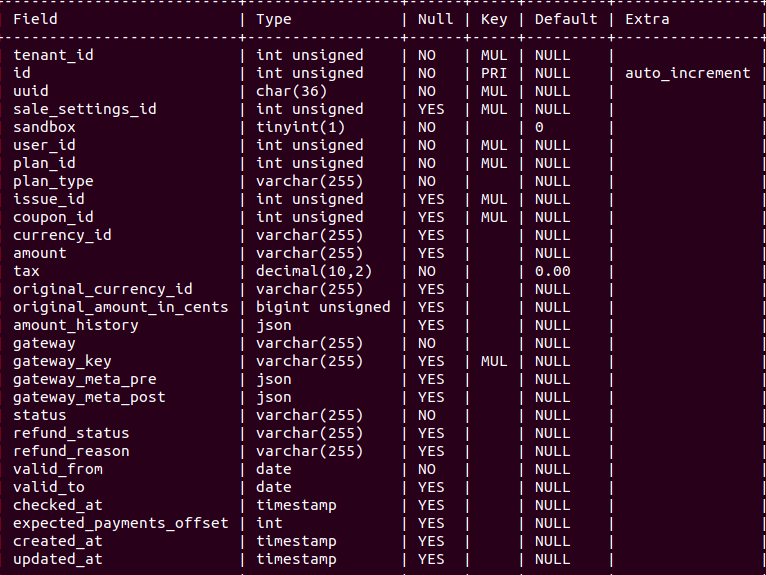
This table is similar to order table in ecommernce website, like this table store user purchases, it can be recurring subscription, prepaid payment, publication purchase or retail purchase.
When user purchase a recurring plan, it store information of purchase in UserPlan table with information like payment gateway, currency used to pay, status of payment, amount paid etc
sale_settings_id: used to store which sale settings used for each UserPlan, so that we can track or know which gateway API keys are used for a particular UserPlan. This will help you retrieve order/payments information from gateway using corresponding API keys even after tenant changed their stripe account
plan_type: stores type of the userPlan. value are given below
recurring Used for recurring subscription, Once user acquired this plan, Payment will be debited from User's account montly until userPlan is cancelled
prepaid Used for limited period access. Once user is aquired this pkan, he will get access to content for given a period
single When user bought a publication, it create userPlan record with type as single. This type doesn't have any valid_to and will be available always
retail This is almost same as single, used when buying publications but when user buy publications which is taken from Publicala marketplace
amount_history: For some recurring subscriptions, tenant will update (increase) recurring amount after a period of time, Amount history will stores all the previous amount for that particular subscription, it will store array of all previous amount with changed date and currency. eg:
[{"amount": 120, "change_date": "2018-08-01", "currency_id": "ARS"}, {"amount": 150, "change_date": "2018-10-01", "currency_id": "ARS"}]
gateway: Stores name of the gateway used for creating UserPlan, it can be real payment gateways like "PayPal", "Stripe", "MercadoPago", "PayU". Or it can be any internal gateway name which we used for to identify different type of purchase. see details below
totalDiscountCoupon: it set when user used 100% discount coupon, in this case, user not needed to make any payment and we cannot set any real payment gateway name.
manual: Tenant admin can manually assign plan to user through control panel. we set gateway as 'manual' for those UserPlan
external: When payment is done outside publicala, Final user will make payment without using publicala and then tenant will create Plan (type : external) with invoice file. then admin can manually assign that external plan to those user to create UserPlan. In this case we used external as gateway name
bulk: When creating UserPlan for multiple users by uploading csv file
lti: For LTI users
All the supported gateways are listed here https://gitlab.com/publicala/farfalla/-/blob/master/app/Support/Gateway.php
gateway_key: stores unique gateway id for that particular UserPlan, This ID can be used to retrieve order/pyament informations from gateway
valid_from and valid_to: Stores information like date from which an UserPlan was activated from and date upto which a UserPlan ends respectively. value of the valid_to is depending on the type of UserPlan,
If valid_to is set and it is passed (means valid_to is less than current date), corresponding userPlan is expired and user cannot access publication using it
For single, valid_to will be NULL, becuase once a publication is bought, user will always have access to it and access will not expire.
For prepaid, valid_to will be fixed date, it set when UserPlan created, For example if user is subscribing to plan which have 2 month duration. it will set valid_to as current date + 2 Months
For recurring, initially it will not set valid_to, but when UserPlan expired/cancelled, it will get valid_to
Payments table
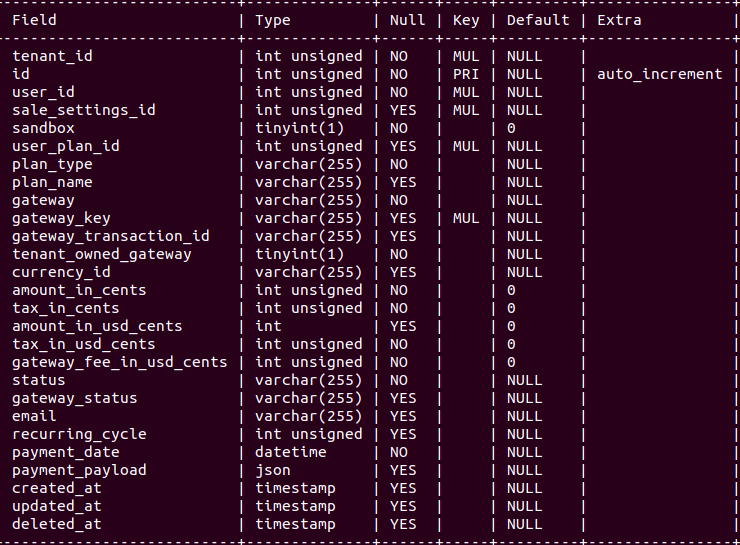
This table stores all the transactions associated with UserPlan, For single, prepaid or retail UserPlan, it has a single transaction associated with it, For recurring UserPlan, it has multiple transactions associated with it(1 for each month).
gateway_transaction_id: unique key from gateway associated with particular transaction/payment
amount_in_cents: stores payments amount in currency sub unit like cents
amount_in_usd_cents: stores payments amount in USD currency
gateway_fee_in_usd_cents: For Stripe there will be a fee by stripe for each payments , This column stores stripe fee for each transaction. (balance transaction API)
status: this column stores unique publicala statues corresponding to different gateway status. Different gateways have status like “open”, “in_process”, “pending”, “processing” etc. In all the cases, this column stores value as “pending”
gateway_status: stores original payment status value from corresponding gateway
Jobs
PaymentHistoryBuilder
We have a job called payment history builder. It inserts transactions in payments table from gateways, PaymentHistoryBuilder job will take each record from UsersPlans table and fetch transactions associated with it and insert in payments table if not already exist. For each gateways , paymentHistoryBuilder job will call corresponding gateway’s API to fetch all transaction for UserPlan, Details are described under each gateway documentation
UpdatePaymentAmountInUsd
In payments table, we have columns like currency_id, amount_in_cents, amount_in_usd_cents
amount_in_cents stores the payment amount in the sub unit of currency_id used for that particular payment, This job will calculate corresponding usd_amounts by calling exchange rate API. It convert amount from current currency to USD cents and update column value
Gateways
We are using 4 gateways for payments integrations. Tenants can configure 1 or more payments gateways and the final user can choose which gateway they want to use for making payments. Gateways are Stripe, Paypal, Mercadopago and Payu
Stripe
Currently we are using session based checkout (Stripe web checkout integration). https://stripe.com/docs/payments/accept-a-payment?integration=elements
Earlier we used stripe legacy checkout integration (token based), So in datatabse you will also see legacy based integrations information like token id for old transactions.
Code flow when user make payments
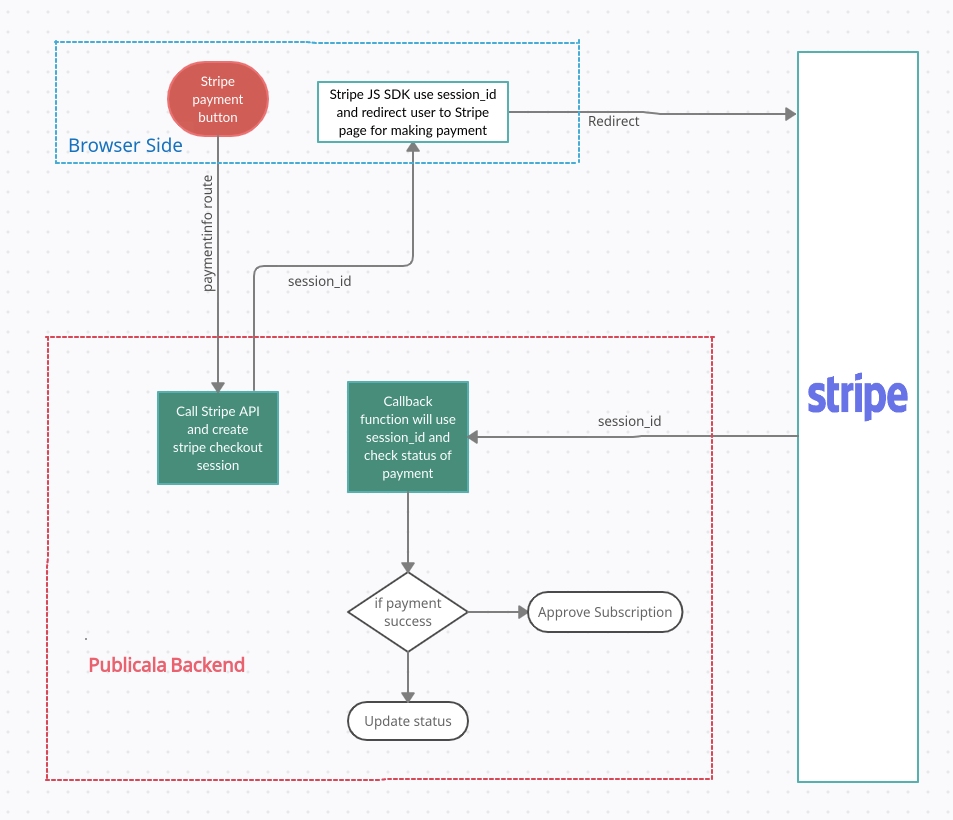
Stripe credit card checkout When user click on stripe button, It call getPaymentInfo() function in SubscriptionControllerto get stripe session_id
It then call createPaymentSession() function in PaymentsController controller and create a UserPlan record with data like gateway, amount, currency, issue/Plan with status as Pending
Then call createRecurringPayment() function in Gateways\StripeRecurringPaymentController for recurring plan or createOneOffPayment() function Gateways\StripeOneOffPaymentController for single payment
Those function will call corresponding stripe API using stripe php sdk and create stripe session id and return it to browser
In frontend, we have used stripe js library, which will accept session_id and redirect user to Stripe checkout page
IMP: Currently only stripe js library can create redirect url and redirect user to Stripe checkout page. We cannot redirect with php sdk..
When user completed payment in Stripe checkout page, it redirected to callback_url, "receivePayment" method in Subscription controller and PaymentsController with parameter "session_id"
From Stripe Controller , getPaymentParams() method will call Stripe Session API to get details of payment using session_id
For recurring , we call Stripe subscription API using subscription_id which we got from session object. For Single payment, we call Stripe PaymentIntent API using intent_id we got from session object
If payment status is success (if gateway returns status like 'active', 'succeeded', 'approved', 'paid', 'trialing'), it will approve UserPlan record, if payment is not success, it will just update status in users_plans table (status may be pending, failed, error etc)
Stripe- WeChat
We also integrated Wechat payment method, Its a sub payment method using Stripe API and we used same stripe php sdk
Website generate a QR code , User scan QR code using WeChat Pay app and Authorize payment, Once user authorize payment, remaining process happening via Webhook and complete payment and approve/fail the UserPlan record
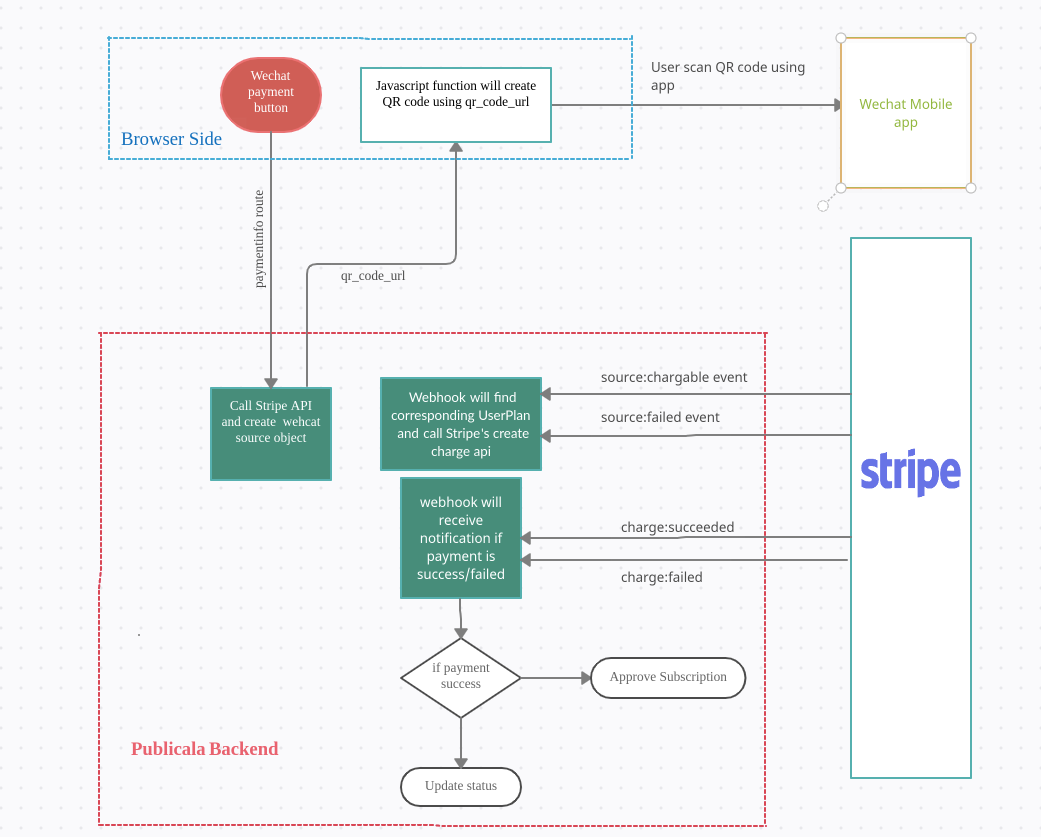
When user click on wechat button, It call getPaymentInfo() function in SubscriptionController In getPaymentInfo() function, if the request contain a parameter “submethod” (wechat), it call a function createPaymentMethodSource() in PaymentsController
createPaymentMethodSource function create a UserPlan record with gateway, currency, amount, plan/issue and call create() function in corresponding Method controller of the gateway
For wechat , it call Gateways\Stripe\Wechatpay::create function, It call stripe API source::create with type as “wechat”. It will create a source object for wechat payment.. This data will return to browser
Javascript in frontend will show a QR code using a url in the source object
User will scan QR code using WeChat app and Authorize payment
Once user authorize or decline payment, Webhook notification will receive on webhook url , function webhook in StripeBaseController, it uses webhook secret revenue_share_stripe_webhook_secret which is defined key in config file platform-sign-up
Source.chargeable event notification will receive when user authorize payment and Then i call stripe API Charge::create with source object
If charge is success , another webhook notification charge.succeeded will receive and then approve UserPlan record
Stripe- Alipay
Integration flow is almost same as WeChat, Its also using Stripe API and we used same stripe php sdk
Instead of showing QR code, User will redirected to Alipay site and user authorize payment there, Once user authorize payment, remaining process happening via webhook (exactly same as Wechat) and complete payment and approve/fail the UserPlan record
Code flow
When user click on wechat button, It call getPaymentInfo() function in SubscriptionController In getPaymentInfo() function, if the request contain a parameter “submethod” (alipay), it call a function createPaymentMethodSource() in PaymentsController
createPaymentMethodSource function create a UserPlan record with gateway, currency, amount, plan/issue and call create() function in Gateways\Stripe\Alipay
It call stripe API source::create with type as “alipay” and user will get redirected to Alipay page Once a user authorize/decline payment on Alipay site, User will get redirected back to a return url and shows payment is processing..Actual payments happening via webhook and return url is just for showing thanks page. Stripe doc also suggest to use webhook for processing instead of depending on return url
Remaining process is exactly same as WeChat pay, Webhook notification Source.chargeable will receive , then call Stripe::charge API , If charge is success , another notification charge.succeeded will receive and approve UserPlan record
What are the ways for approving a Stripe Payments
ReceivePayment callback url
For Stripe, we only have single option , callback url to update the UserPlan status, In our previous experience It worked always because user will comeback to callback_url only if payment on stripe is success
Related Jobs
UpdateStripeFeeInExistingRecords, This job will actually update gateway_fee_in_usd_cents column value.. This job will check latest Stripe payments and check balance_transaction_id in payment_payload, Then call BalanceTransaction API to find stripe charge of particulat transaction and update in payments table
PaymentHistoryBuilder job for Stripe
When PaymentHistyoryBuilder job processing stripe UsersPlans records, it will use getOneOffPaymentDetails() in StripeOneOffPaymentController and getRecurringPaymentDetails() in StripeRecurringPaymentController
getOneOffPaymentDetails() function will use value in column 'gateway_post_meta' in users_plans table and insert transaction details in payments table
getRecurringPaymentDetails() function will call Stripe Invoice API to get all payments under a UserPlan (type = recurring), Invoice API will return all invoices associated with subscription, To get payments corresponding to each invoice, we call Stripe charge API by using charge_id in invoice object and insert transaction record in payments table
in Both cases, we call Stripe balance transaction API using 'balance_transaction_id' in transaction object, Balance transaction API will return stripe fee coresponding to a payment, we store in payments table 'gateway_fee_in_usd_cents' column.
Paypal
When the user clicks the PayPal button, the user will be redirected to the paypal page and makes payment there. Once payment is success, user will redirected back to return url and update/approve payments in UserPlans table
Code flow when user make payments
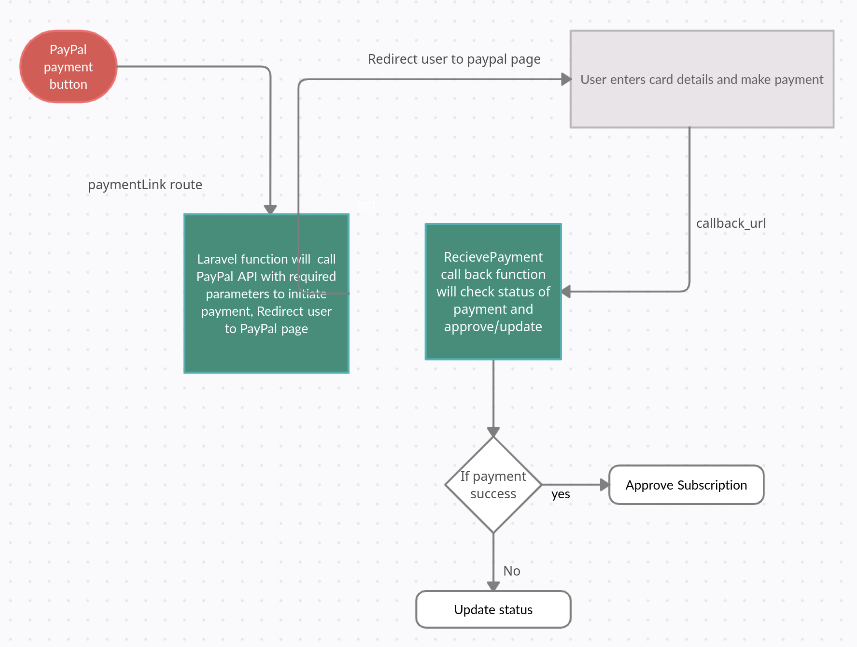
When user click on PayPal button, call function getPaymentLink() in SubscriptionController controller It then call getPaymentLink() function in PaymentsController and create UserPlan record with data like gateway, amount, currency, issue/Plan with status as Pending Then call function createPayment() in corresponding gateway controller, Here it is Gateways/PayPalController and create a url and user get redirected to PayPal page If payment on PayPal page is success, get redirected back to route receivePayment function receivePayment() in SubscriptionController and approve UserPlan record
What are the ways for approving a PayPal Payments
1.ReceivePayment callback url
Once user successfully completed payments in paypal page, user will redirected back to callback url, Then it will update the status of order in users_plans table, In our previous experience It worked always because the user will come back to callback_url only if payment on paypal is successful. So there was no issue reported yet says UserPlan is pending but there are approved payments
- CheckPayPalRecurringPayments
This job will process only “approved” paypal payments, So this job will not approve any pending UserPlan.This will process only approved UserPlan and check current status of subscription in PayPal and update in UserPlans table. If subscription status is still active , it then check last_payment_date, if it is greater than 31 days, we will pause that UserPlan
Mercadopago
When user click on MercadoPago button, user will redirected to mercadopago page and makes payment there.Then user will redirected back to callback_url to update/approve status of order in users_plans table
Code flow is exactly same as PayPal, Gateway related controller is Gateways\MercadoPagoController
What are the ways for update a Mercadopago UserPlan status
1.ReceivePayment callback url
Once a user completes payments in the Mercadopago page, the user will be redirected back to callback_url and then update payment status.
2.CheckMercadoPagoOneOffPayments
This job will process only UserPlan that are in pending status, if UserPlan has single approved payment in payments table (also validate paid amount is equal or greater than plan amount), job will approve the UserPlan
3.CheckMercadoPagoRecurringPayments
This job currently processes only approved UserPlans and check payments associated with it. If approved payments count is less than minimum expected payments count, the job will pause UserPlan. When calculating expected payments we will wait end of a month to count a month , we used php diffInMonths() function, so it will count 1 only when UserPlan just completed a 30 days
We are going to change this, in this spring like we will start to process “pending” UserPlan and the approve if we have more payments than expected
PaymentHistoryBuilder job for MercadoPago
PaymentHistoryBuilder job will call getOneOffPaymentDetails() and getRecurringPaymentDetails() functions in MercadoPagoController to fetch corresponding payments and insert to payments table
getOneOffPaymentDetails() is used to get payments associated with oneOff payments, getRecurringPaymentDetails() is used to get payments associated with recurring UserPlan
both function call mercadopago search API to get payments associated with UserPlan, we use external_id to get payments from mrcadopago API. We user uuid in users_plans table as external_id, So we are passing uuid column value as external_id for getting payments associted with a UserPlan. For old records (UserPlan created before 2018-10-04), we had used primary_id as external_id, So for those records we need to pass value id to get payments from MercadoPago API , check function externalReference() in UserPlan model
PayU
Payu handle only oneOff payments
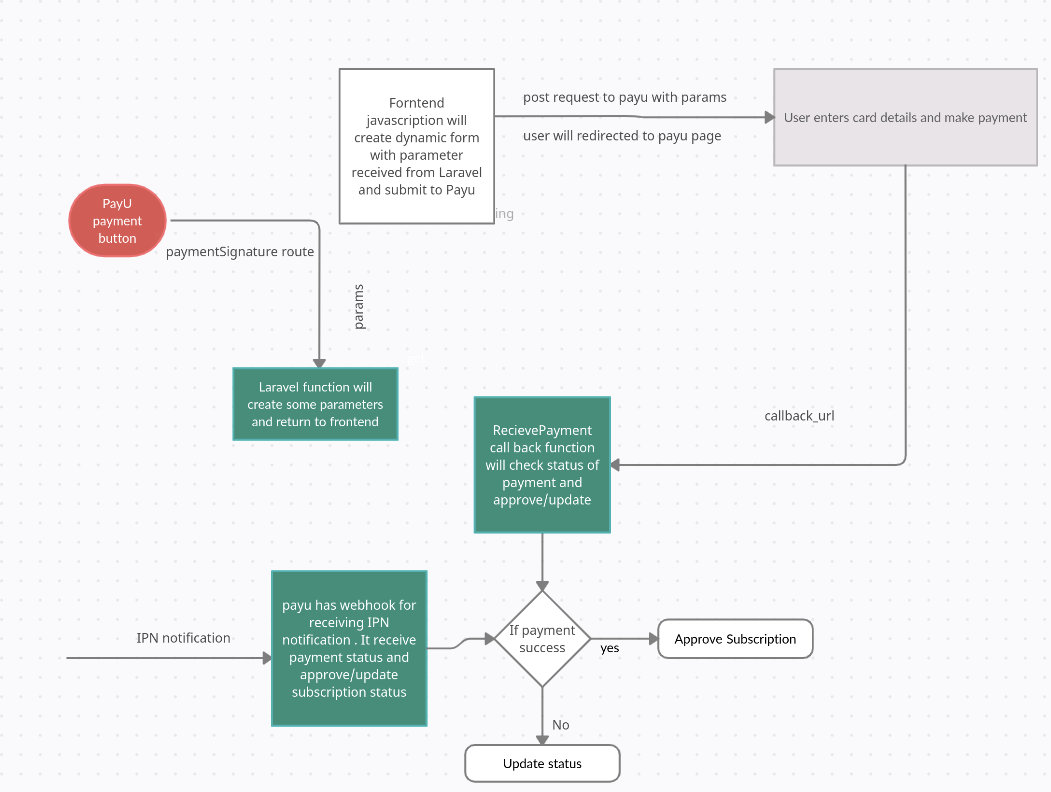
When user click click on payu button, it make an ajax call to back to prepare form parameters, that needed to submit to PayU, Vue function will create a dynamic form using the paramers received from backend and submit to the PayU Url, Thhen user will redirected to PayU page and user make payments there. Once payment completed user will redirected back to callback_url
Code flow when user make payments
-
When user click on PayU button, call function getPaymentSignature() in SubscriptionController controller
-
It then call getPaymentSignature() function in PaymentsController and create a UserPlan record with basic data
-
It then call Gateway related controller, Here it is createPayment() function Gateways\PayUService
-
It call BasePayUService and generate form parameters with payment data and return to frontend, Then in js file, reusable-components/PaymentLinks.vue , it generate a dynamic form and submit to PayU
-
User will get redirected to PayU page and complete the payment. Once payment is finished, user will get redirect back to receivePayment() function in SubscriptionController and then it approve UserPlan if payment was successful, also and update gateway info in UserPlan record
-
PayU also receive an IPN notification on route receivePaymentEventsApi, PaymentsIpnController@handle function
-
It call Gateway related IPN controller, here it is Gateways\PayUIpnController and update/approve UserPlan record and update gateway info in UserPlan record
What are the ways for update a Payu UserPlan status
- ReceivePayment callback url
Once user completed payments in Payu webiste, user will redirected back to callback_url, Then it will approve/update the UserPlan status
- CheckPayUOneOffPayments
This job runs hourly, It will process any pending UserPlan, created in last 1 week, and check if it has any approved payments, if so, it will approve UserPlan. This job was created to fix some issues reported earlier that both 1 (callback_url) and 3rd (IPN notification) option to approve PayuScubscription not worked and payu UserPlan has approved payments but still status of UserPlan was 'pending'
- IPN notification
For Payu UserPlan, we will receive ipn notification from Payu and we have webhook to receive payu IPN notification and then update latest status of UserPlan
We are recording all there payu ipn notifications in table called ipn_records
Plan GatewaysMeta Strategy
- As the name indicates, we have a table called 'plan_gateways_meta" where we store Plan information from Gateway. For example when user "A" subscribes to a plan "X", we will need to create this plan on gateway first, then we store gateways's plan information in column "gateway_meta" in table plan_gateways_meta and then we subscribe user A to that plan in gateway. When second User "B" going to subscribe the same plan "X", we don't need to create that plan again in gateway, we just need subscribe user "B" to plan "X", by taking gateway's plan information from the column "gateway_meta"
Currently we are using this feature for Stripe and PayPal
plan_gateways_meta has a sale_settings_id that means, gateway_meta will different for each sale settings record
Below is the explanation of how its works for Stripe and PayPal now
When a user click subscribe button for recurring plan. First we check last record in plan_gateways_meta for the corresponding plan
-
If no records exist, in table, we will create a new billing plan in gateway and store in plan_gateways_meta table with current sale_settings_id, then subscribe user to billing plan we created
-
If record exist and sale_settings_id is same as the current sale_settings_id, then we just take billing plan data from table and subscribe user to it
-
If record exist, but sale_settings_id different from current sale_settings_id, then we check two conditions as below
-
if gateway's current sale setting client_id is the same as gateway's client_id of the sale settings attached to gateway meta record, If same we will just copy gateway_meta column data and create a new record with it and current sale_settings_id.
-
When checking condition 4, if client_ids are different, we will create new billing plan in gateway and create new record in plans_gateway_meta table with current sale_settings_id
Payment Statuses from Gateways and its corresponding status in Publicala
Since we have multiple external payment gateways integration, they all have different status names for each conditions
Example, For PayPal successful transactions of recurring billing, it returns status as 'Completed' from PayPal, but for Stripe, it will return status as 'approved'.
Converting different gateway statuses to corresponding publicala UserPlan status will help filter UserPlan records based on status
we are storing both gateway_status and corresponding publicala status in payments table
-
we store status = 'approved' for all the below statuses return from gateway mercadopago: approved
paypal: approved paypal: Completed payu: APPROVED stripe: approved stripe: succeeded stripe: paid stripe: trialing stripe: active -
we store status = 'pending' for all the below statuses return from gateway
mercadopago: in_mediation mercadopago: in_process mercadopago: pending paypal: Unclaimed paypal:Uncleared stripe: created stripe: open stripe:draft
- we store status = 'cancelled' for all the below statuses return from gateway
mercadopago: cancelled mercadopago: rejected payu: DECLINED
- we store status = 'refunded' for all the below statuses return from gateway
mercadopago: charged_back mercadopago: refunded paypal: Refunded stripe: void
- we store status = 'error' for all the below statuses return from gateway payu : ERROR paypal: null, '' mercaodopago: null, '' stripe: uncollectible stripe: failed
If system couldn't find publicala status for corresponding gateway status (it happened in many cases like gateway's payment status API returns null or incorrect status returned from gateway), we will not update UserPlan status column and keep it as "pending" as before. But we log information to identify the problem