External Auth Embedding - Integration system for signing in external users
Introduction
It is a project developed to provide a unified and customizable authentication mechanism for different platforms. This system allows users to enter their credentials through a centralized form and authenticate against an external server. Once the user's identity is verified (receiving some kind of unique identifier), an Auth Token will be generated, which will serve as the access key on the main Publica.la server. Our infrastructure is designed to be flexible and compatible with web interfaces and mobile applications, providing a consistent user experience on different devices.
Integration Process
To add and customize an integration, the following guidelines and procedures must be considered:
Initial Considerations
- Association with Tenant: Each integration must be associated with a unique tenant of Publica.la, which must be preconfigured on the platform.
- Authentication via Auth Token: Service security and authentication are done using authentication tokens for communication with our servers.
- User Identification: There must be a unique user identifier, which will be used for association on our platform with the external user.
- Access Determination by External Server: The external tenant server authorizes access to the Publica.la platform. The failure or instability of the external system will interrupt user authentication.
Definition and Integration Services
An interface must be created which will be embedded wherever it is to be implemented. This interface will receive the user's identification credentials and be compatible with most cutting-edge technologies existing in the market. Then, with services from our infrastructure, we will communicate with the external server to validate this data, control the shared information, and perform relevant authentications both on the external platform and on Publica.la.
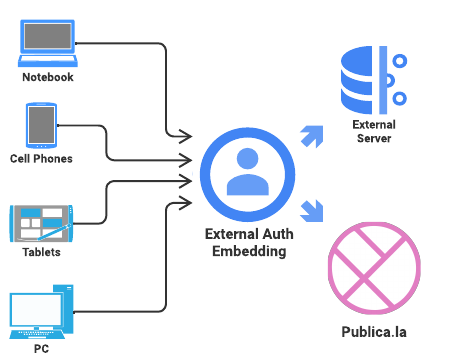
Requirements for operation
-
External server endpoint: the URL of the external server to which the user must be authenticated is required.
-
Data necessary to validate the user: Set of data necessary for the external platform to validate the user.
-
Information validation: Verify if there are any prerequisites for validating the data before sending.
-
Data sending format: Specification of the format and structure in which the server expects to receive the information.
-
Password change endpoint: Is there an address to which we should direct the user so they can change their password?
-
Satisfactory responses:
a. User identification: There must be a unique user identifier to associate it in our platform with the external user.
b. Expected HTTP status: Is there a defined response status? (e.g., 200)
c. Response format: Specification of the format and structure in which response data are sent.
-
Unsatisfactory responses:
a. Possible error codes and their responses: Set of possible response codes and their customized responses for the user.
b. Data response format: Specification of the format and structure in which the server expects to receive the information.
-
Additional information available to the user: Provide information prior to entry, such as Terms and Conditions, FAQ, etc.
-
Logos, styles, and designs: Provide all necessary resources (images, colors, styles, fonts) to adapt the user experience. Specify any differences between the different platforms where integration is desired. If the necessary resources are not available, assistance will be provided to recreate the experience as accurately and reliably as possible with the available resources.
Communication of Responses and Events
At all times, we will be able to interact and customize the user experience, obtaining responses from both sides (external integration server and our Publica.la service), being completely transparent to the end user. These will inform and react according to messages and communication events, and once the validation has occurred, the user will only be redirected to where appropriate or informed that they do not have the necessary permissions to continue.