Saml
Overview
This document provides information about Saml.
Security Assertion Markup Language (SAML) is an open standard that allows identity providers (IdP) to pass authorization credentials to service providers (SP, ourselves).
It enables Single-Sign On (SSO) from several IdP (Azure AD, OpenAthens, Google Suite, etc) to our platform (SP).
SAML transactions use XML for standardized communications between the identity provider and service providers. Each provider has it's own metadata xml with their own directives.
We are currently using this library based on OneLogin toolkit
You can read more:
Pre-requisites
Required for use:
- Have Unlimited or Revenue Share plan
- Enabled feature "SAML - Api Integration"
- The admin should have the Identity Provider metadata XML (or its properties)
How does it work?
SAML 2.0 allow final users to login automatically from their Identity Provider (Idp initiated SSO) or using a login url (SP initiated SSO) without the need of sharing their credentials with us, as long as that user is logged in their IdP.
The diagram below illustrates the SSO flow for SP initiated SSO, i.e. when we trigger a SAML SSO and redirect them to the IdP to validate their identity.
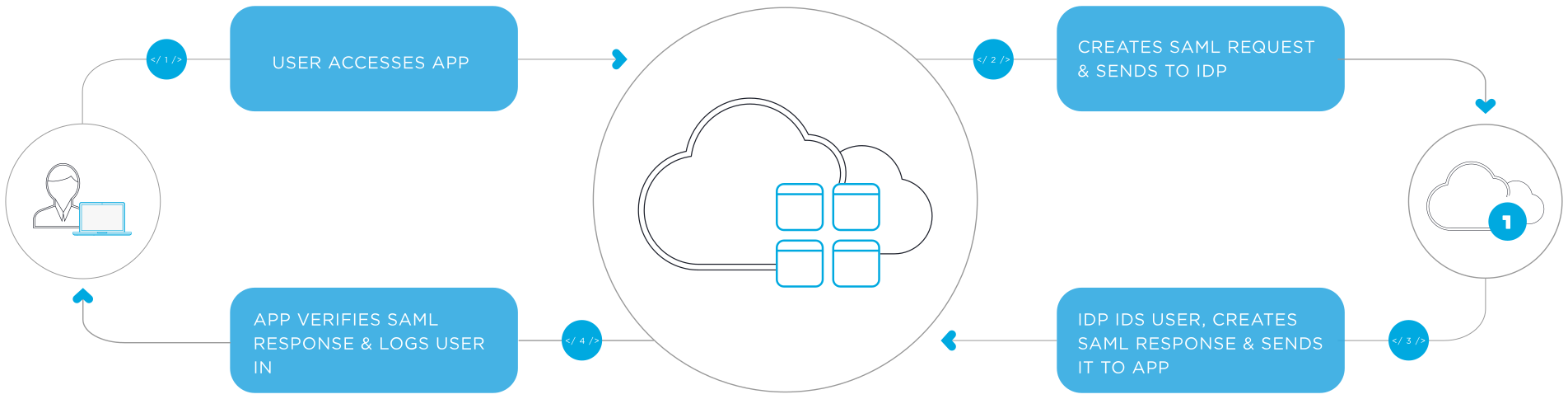
IdP initiated SSO is similar and consists of only the bottom half of the flow.
The callback for both IdP initiated SSO and SP initiated SSO will be handled at app\Listeners\Saml2Callback.php, where the login and the plan assignation will occur.
We should receive the email from the IdP. That email should be sent either as the NameID (the primary identifier) or as a custom attribute called emailAddress and reader_exit_url.
We log SAML SSO attempts in Sentry for debug purposes. For a successful log in you should be able to see the user's email in the extra.user_id column when using NameID, or in the extra.saml_attributes.emailAddress.0 column when using emailAddress custom attribute.
Be careful, some IdP use propietary claims as custom attributes by default, those will fail. The only supported custom attribute is emailAddress and reader_exit_url, if any other claims are set in the integration settings (from the IdP side), you could delete them and create the custom attribute emailAddress with the user's email value or reader_exit_url to specify a reader exit url.
Wrong custom attributes/proprietary claims examples from error logs:
- http://schemas.xmlsoap.org/ws/2005/05/identity/claims/emailaddress (error log:
extra.saml_attributes.http://schemas.xmlsoap.org/ws/2005/05/identity/claims/emailaddress.0) - http://schemas.microsoft.com/identity/claims/identityprovider (error log:
extra.saml_attributes.http://schemas.microsoft.com/identity/claims/identityprovider.0) - ...
How to configure it?
- Go to
settingfromcontrol panel - Select
integrations - Create a new integration at
SAML Settings- Set a simplified name for the integration at
consumer key. This will be used when generating the URLs for the SSO. For example, the login url for an integration nameduniversidad-nac-fedvilat Macro store would be https://ebooks.editorialmacro.com/saml2/universidad-nac-fedvil/login - From the IdP metadata (in the xml file), complete the following properties:
- Entity ID (entityId)
- Single sign on service URL (SingleSignOnService)
- Single logout service URL (SingleLogoutService)
- x509 certificate (X509Data)
- Set a simplified name for the integration at
- Once you save it, you will have access to our metadata:
- Login URL (for a SP initiatied SSO)
- Metadata URL (you can open that URL or download the XML file)
- You can now create the integration from the IdP side using the following parameters from our metadata:
- Login URL (copy it from the integration details)
- Entity ID (md:EntityDescriptor.entityID)
- Assestion Consumer Service URL, aka ACS URL (md:AssertionConsumerService.Location)
- Single logout service URL (md:SingleLogoutService.Location)
- x509 certificate (ds:X509Certificate)
Note: The library we use requires a config file for each integration. So, to make it dynamic, we use the service provider app\Listeners\SamlServiceProvider.php to creates that config at runtime, based on the tenant's data from step 3 and using config\saml2\sso_idp_settings.php as template.
Session duration
- The session will expire after 2 hours of idle time.
- The session will immediately expire on the browser closing.
How to test an IdP initiated SSO
To test SAML integrations we can use any dummy identity provider that allows us to trigger an IdP initiated SSO. And since SAML2.0 uses redirects from the browser, we can even test it in our local environments with .test or .loalhost domains.
A good option is onelogin.com, which allows us to create a dummy identity provider with a free account. This is the one we hardcoded in farfalla's SamlEntryPointsLoginTest Pest tests.
OneLogin has this guide on how to setup a "SAML Custom Connector (Advanced)": https://onelogin.service-now.com/support?id=kb_article&sys_id=8a1f3d501b392510c12a41d5ec4bcbcc
Things to consider:
- In this tests, there's no actual validation of the SAML URLs configured in farfalla. This is because it's an IdP initiated SSO, and the only things we validate is the certificate and information such as
NameID. - The config in farfalla can be almost 100% dummy, with the exception of:
- The "Consumer Key" which we can set to any value
- The "x509 certificate" which we need to extract from the XML metadata file from OneLogin
- OneLogin allows you to create test users, make sure to:
- Grant them access to the "SAML Custom Connector (Advanced)" you create
- Optionally, in the "SSO" tab check the checkbox "Allow assumed users to sign into this app" to test the integration without the need of creating actual passwords for the test users. After that, you can assume the user and login.
- Basic farfalla config. First, we should create the integration in our tenant with a "Consumer Key" that we like and a dummy "x509 certificate".
- Basic OneLogin config. Then we go to OneLogin and create a new "SAML Custom Connector (Advanced)" with the following parameters:
- "Audience (EntityID)" -> https://yourtenant.farfalla.localhost/saml2/{your_consumer_key}/metadata
- "Recipient" -> https://yourtenant.farfalla.localhost/saml2/{your_consumer_key}/acs
- "ACS (Consumer) URL Validator*" ->*
- "ACS (Consumer) URL*" -> https://yourtenant.farfalla.localhost/saml2/{your_consumer_key}/acs
- "Single Logout URL" -> https://yourtenant.farfalla.localhost/saml2/{your_consumer_key}/slo
- "SAML initiator" -> OneLogin
- References here:
- Farfalla's "x509 certificate".
- Go to the "SSO" tab
- Download the XML medatada file from "Issuer URL"
- Copy the "x509 certificate" from the XML file and paste it in the "x509 certificate" field in the "SAML Settings" tab in farfalla.
- Save the integration and you should be able to login with OneLogin.
- Go to your user's OneLogin Portal and click on the "SAML Custom Connector (Advanced)" you created.
Tools
- SAML-tracer browser extension. Useful to follow SAML messages
- Validate SAML messages (Metadata, AuthnRequest, SAML Response) https://www.samltool.com/validate_xml.php
- To test IdP or SP assertions https://www.onelogin.com/